
This page explains the Y999 Game Download for Android and iPhone: where the official link is, how installation differs on each phone, and how to avoid fake copies of the app. Y999.wiki is an independent guide. The app itself comes from Y999.
Y999 Game Download (official link)Visit y999.com
The download button uses our referral link, so we may earn a commission if you sign up. It costs you nothing extra. Read our disclaimer for details.
Before you download Y999
- You must be 18 or older, and real-money gaming must be lawful where you live.
- Use only the button above or the official y999.com site. Do not use links forwarded in chat groups.
- Make sure your phone has a screen lock and some free storage.
- Decide on a spending limit now, before you see any offers. Our responsible gaming guide explains how.
How to install Y999 on Android
- Open the official download link in Chrome or your usual browser.
- If the page offers an Android app file, download it. Android may warn you about files from outside the Play Store.
- If Android asks, allow installs from your browser for this one install, then open the file and tap Install.
- When the install finishes, turn the “install unknown apps” permission off again in Settings.
- Open the Y999 icon and log in or create an account.
Apps with similar names may show up in store searches. Install only from the official link, not from store search results or file-sharing sites.
How to install Y999 on iPhone
On iPhone, Y999 is added through a configuration profile. The profile screen shows that it contains a web clip, which places a Y999 icon on your home screen. These are the seven steps shown in Y999’s own install guide:
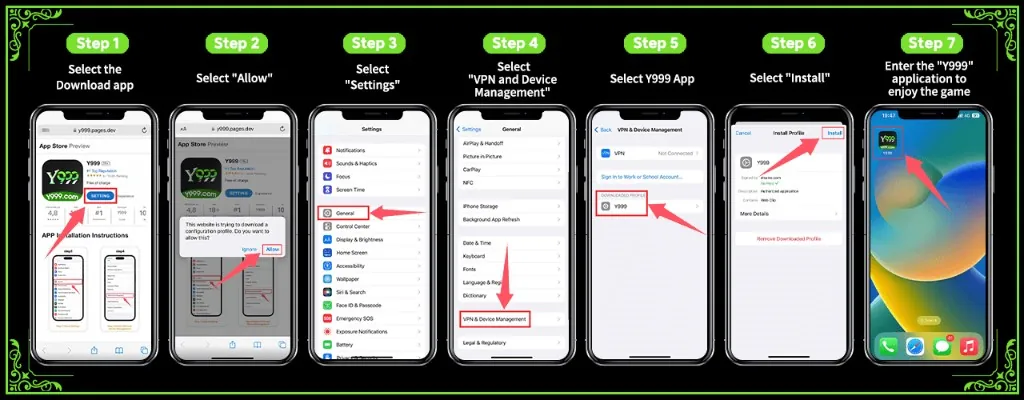
- Open the official link in Safari and tap the download button.
- When iPhone asks to download a configuration profile, tap Allow.
- Open Settings.
- Go to General, then VPN & Device Management.
- Under Downloaded Profile, tap Y999.
- Tap Install and confirm with your passcode.
- Go back to the home screen and open the Y999 icon.
You can remove the profile at any time in Settings, then General, then VPN & Device Management. Never install profiles sent by people you do not know.
How to spot a fake Y999 download link
- It promises guaranteed wins, “unlimited coins” or a modified app.
- It asks you to pay to download, or to send money to a personal wallet.
- It asks for your wallet PIN, OTP or password.
- The web address is misspelled or is a link shortener you cannot check.
- It comes from a stranger in a WhatsApp, Telegram or Facebook group.
After you install the app
New to Y999? Follow our guide to creating a Y999 account. Already registered? See how to log in safely. Before you add money, read our JazzCash and Easypaisa deposit guide, and browse the Y999 games by category to see what is on offer.
Y999 Game Download: frequently asked questions
Is this the official Y999 download link?
The button on this page opens the download link from Y999’s own invite program, which carries our invitation code. Y999.wiki is not the operator. We are an independent guide and may earn a commission on sign-ups through this link.
Does Y999 work on iPhone?
Yes. On iPhone, Y999 is installed through a configuration profile that adds a Y999 web clip to your home screen, as shown in the steps above.
Does the Y999 Game Download cost anything?
Y999’s install page lists the app as free of charge. Deposits and bets inside the app use real money.
Who can use Y999?
Only adults aged 18 or over, and only where real-money gaming is lawful. Check your local rules before you register.